
How can we help you?
How do I set up email filters?
Email Filters allow you to set up automatic processes for managing your Email. This can be used for moving certain Emails to a particular folder, deleting the message, sending an automated response and a host of other options.
To set up an Email Filter, log in to your Webmail Inbox and go to Settings. You can find this in the top left of the screen.
You can then go to the Filters section:
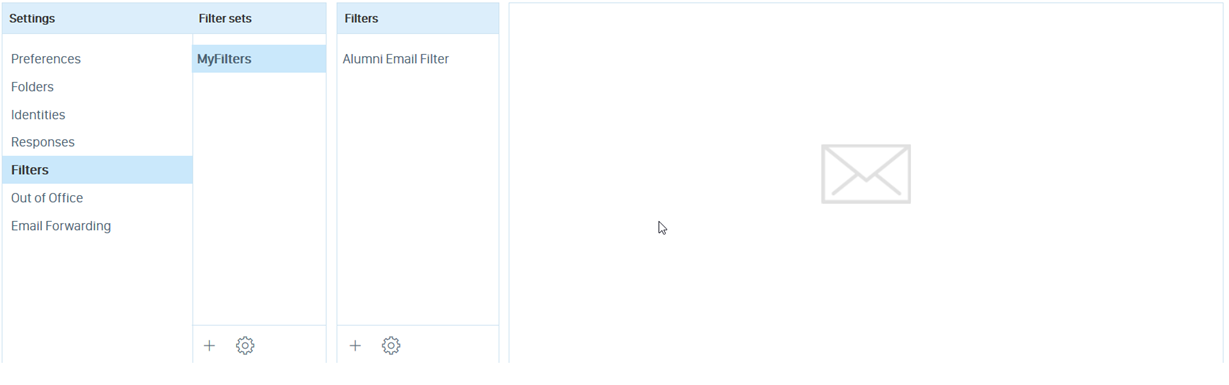
To set up a new Filter, follow the steps below:
- Click on the small plus sign (+) under the Filters heading. This will bring up all the options for setting a new Filter.
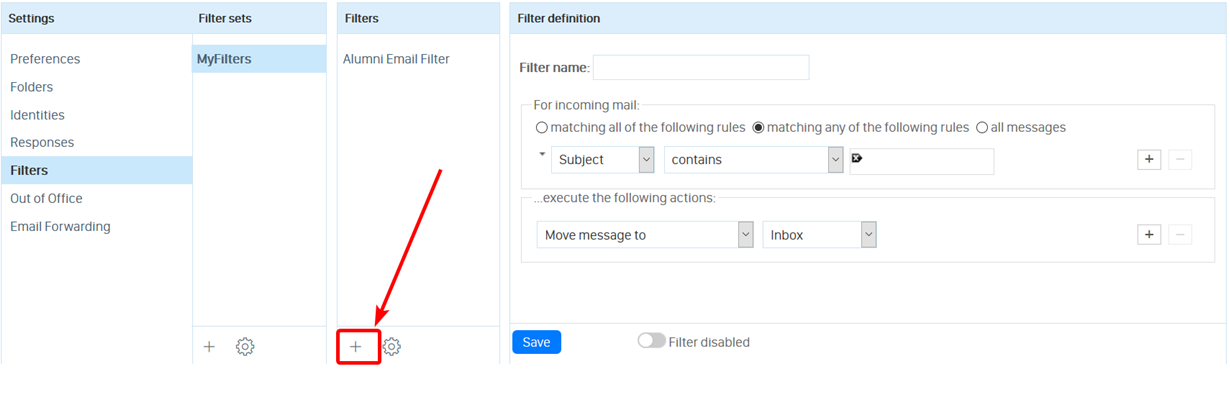
- Add a Filter name and some rules to your Filter. Rules are added under the For incoming mail section, and contain a variety of different conditions you can set. Use the dropdown boxes to select the rule you wish to set up. You can add and delete rules using the +/- buttons on the right.
- Add an action for the filter to perform if the rules are met. This is done under the execute the following actions section, and you can use the dropdown boxes to decide what actions are taken.
- You can enable or disable the filter using the Filter disabled toggle at the bottom of the screen.
- Once happy with your Filter, you can click Save.
After a filter is saved, it will appear in the list under the Filters column. To edit the Filter again, you can simply click on it in this list.
If you require any assistance setting up a Filter for your email account, please contact our support desk, who will be more than happy to help. You can contact them at help@aluminati.net